Debugging Redis::CannotConnectError in Ruby
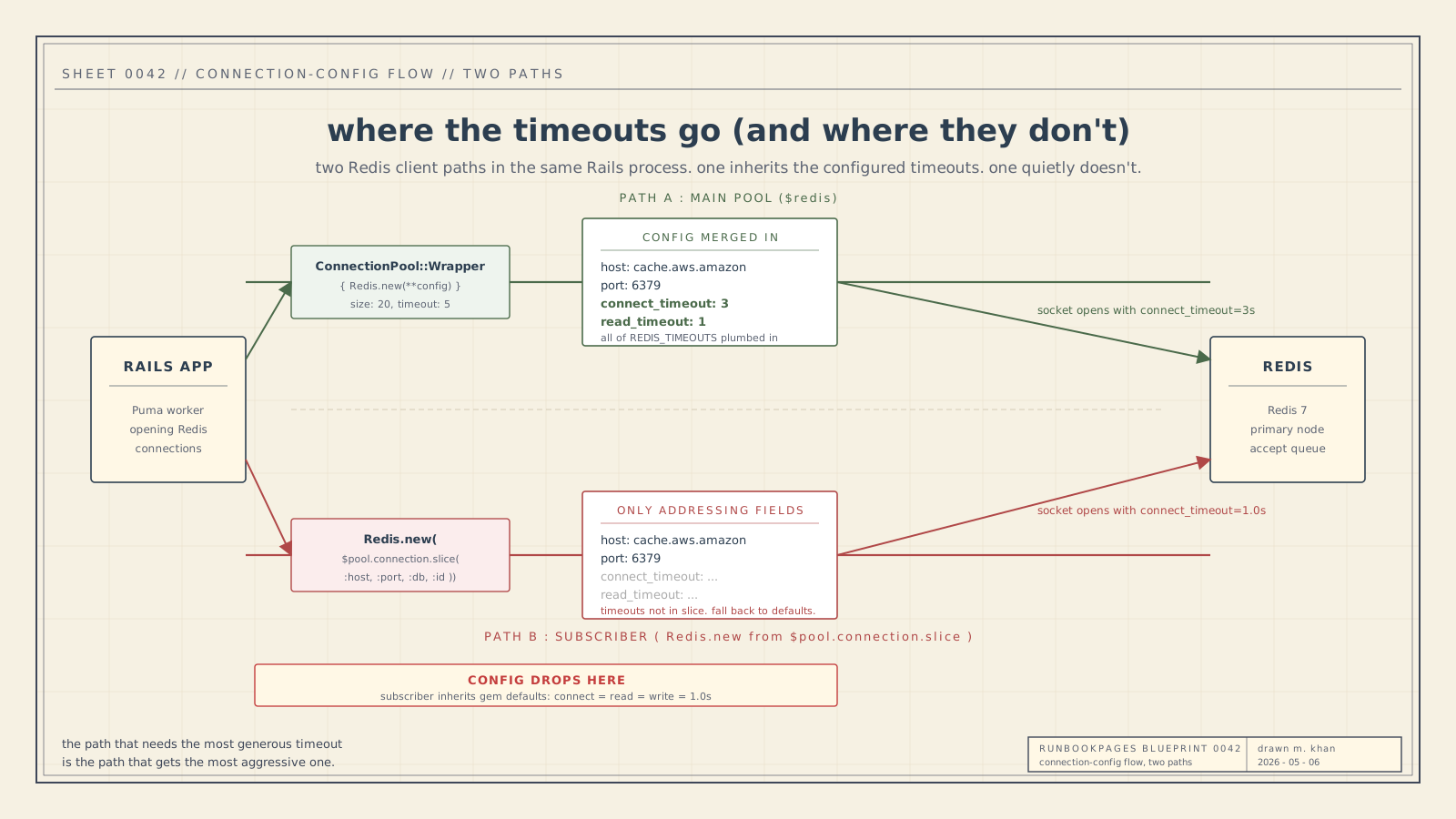
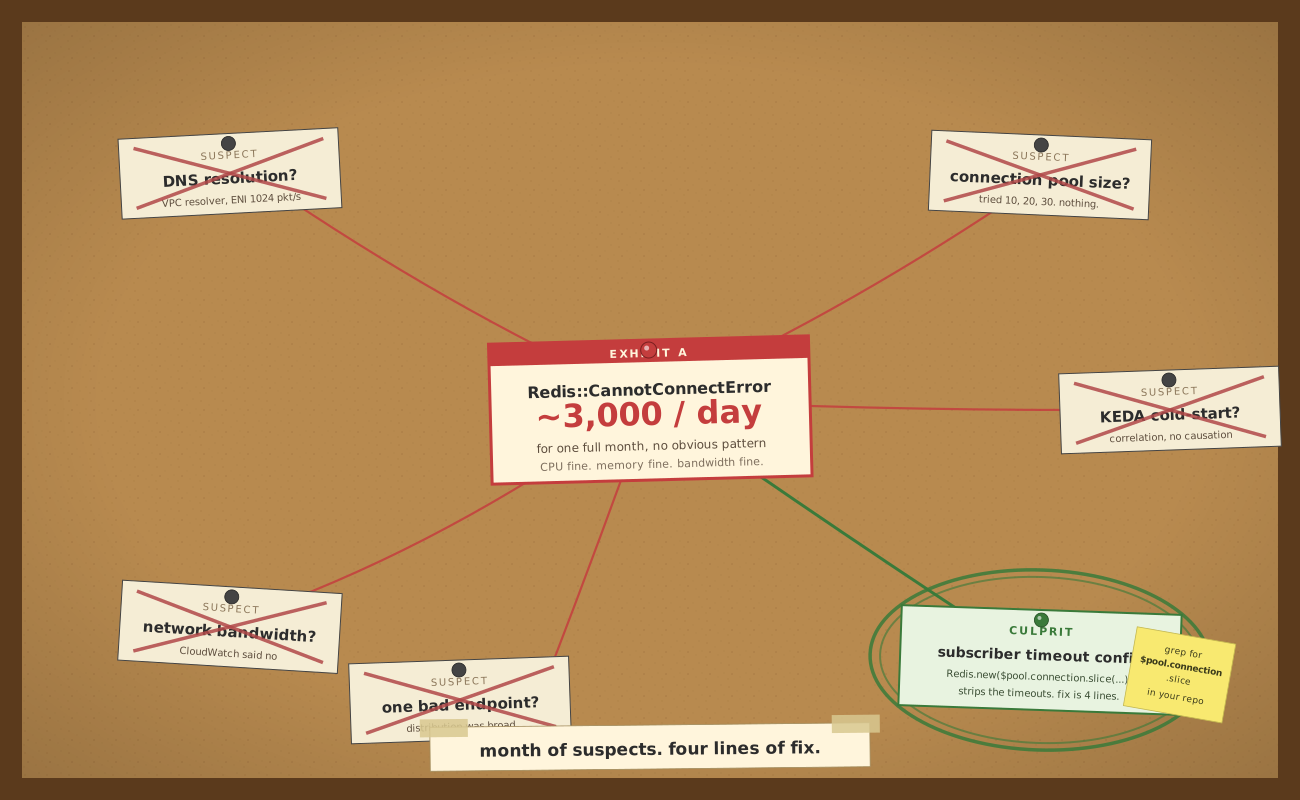
For about a month, a Rails app I work on kept getting hit with bursts of Redis::CannotConnectError, all of them carrying the same connect-timeout message. Each burst lasted two or three minutes, then went silent for hours. The daily totals were big enough to be alarming (five thousand on a bad day, two thousand on a quieter one) but the bursts themselves were short and the gaps between them long. The error tracker started auto-grouping them as a single recurring incident.
The dashboards I usually trust for this kind of thing were unhelpful. CPU on the cache was fine. Memory was fine. Network bandwidth wasn't close to the cap for the instance type. There was no failover event, no maintenance window, no obvious correlated deploy.
The fix turned out to be four lines.
I want to write down the runbook I wish I'd had at the start, because the things that mislead you when debugging this class of error are pretty consistent across clients and across infrastructure. The specific gotcha that bit me is genuinely undocumented as far as I can tell, but it sits inside a broader debugging frame that's worth having before you go looking for it.
What the error string actually tells you
The first thing worth doing, before any dashboard or any change, is reading the exception string carefully and figuring out which layer of the stack failed.
In redis-rb, the connection-related exceptions sit under one base class and split into a few siblings1:
Redis::CannotConnectErrorcovers everything where a connection couldn't be opened in the first place. Connection refused, host unreachable, DNS failure, TLS handshake failed, and connect timeout. It's a single class with several quite different causes underneath.Redis::ConnectionErroris for an established socket dying mid-flight (ECONNRESET, server-initiated close).Redis::TimeoutErroris for I/O on an established socket taking too long (read timeout fromread_timeout, write timeout fromwrite_timeout, or a blocking command exceeding its bound).
This last point is worth separating from common Stack Overflow framing: TimeoutError is the I/O-on-an-established-connection timeout. A connect timeout, where the TCP handshake itself never completed in time, surfaces as CannotConnectError. The shape of the failure was a timeout, but the class is the connect-side one.
In the Ruby client, that's exactly what the source path does. Inside redis-client's RedisClient::RubyConnection#connect (lib/redis_client/ruby_connection.rb), the relevant call is2:
Socket.tcp(@config.host, @config.port,
           connect_timeout: @connect_timeout,
           resolv_timeout: @connect_timeout)
When the TCP handshake exceeds connect_timeout, Socket.tcp raises Errno::ETIMEDOUT. The connect path catches it, mutates the message to append ": #{@connect_timeout}s", re-raises, and the outer rescue in the same method translates it to RedisClient::CannotConnectError with that message. From the application's view, the exception comes out the top as Redis::CannotConnectError (the redis-rb wrapper class) carrying a message like Connection timed out: 1.0s.
So when you see a CannotConnectError whose message ends with s (the appended timeout duration), you're reading specifically the connect-timeout sub-shape of CannotConnectError, raised from RubyConnection#connect after Socket.tcp failed to complete the handshake within your configured connect_timeout. Different sub-shape from a connection refused (which surfaces as Errno::ECONNREFUSED and gets the same wrapping but a Connection refused message).
The non-connect-timeout exceptions read differently. A read-phase timeout surfaces as Redis::TimeoutError from the client's BufferedIO read loop with a Waited X seconds message. A closed-mid-flight connection surfaces as Redis::ConnectionError. Two different exception classes, two different code paths, two completely different things to check next.
This sounds obvious in writing. It's the easiest step to skip when you're staring at a count of three thousand in your error tracker and you want to start fixing things.
Client defaults change between versions and that bites you
The next thing worth checking is what your Redis client thinks its defaults are right now, and whether they match what you think they are.
The setup here is redis (redis-rb) 5.x, on top of redis-client 0.x. The redis-rb 5.0 release in 2022 made two default-tightening changes that still matter on any 5.x version3.
The default client timeout dropped from 5 seconds to 1 second. This applies to connect, read, and write timeouts unless you set them individually. Older versions of the gem were forgiving in a way newer versions aren't.
The default is defensible. A 5-second connect timeout in a Rails request path means your worker can sit blocked for five seconds on a single Redis call, which is unacceptable during an incident. The maintainers have written that the new defaults are part of a broader "fail fast, surface the problem" philosophy: silently retrying connection failures masks infrastructure issues you should actually be debugging.
But here's the thing that surprised me. Every visible error in your dashboard is a post-retry error. The client has already tried once, failed, retried, and propagated the exception. Your real underlying failure rate is higher than what you can see. If you're trying to root-cause something rare, the rare thing is happening at least twice in a row before it ever surfaces.
A separate gotcha in the same family. The underlying redis-client gem has its own internal defaults that the wrapper sometimes overrides. The wrapper's reconnect_attempts: 1 runs even though the underlying client's own default is false (no retries). This kind of layered-default situation is common across clients, where a higher-level wrapper (a connection pool, a Rails cache adapter, an ORM integration) will quietly set values that don't match the underlying library's documentation. Always verify what's actually configured at runtime, not what the README says the default is.
The biggest trap: reconstructed clients silently drop config
This is where the actual bug lived, and I think it's the part of this runbook that's least documented elsewhere.
The general pattern: any time your code constructs a new Redis client on the fly from the connection metadata of an existing client or pool, you risk silently dropping configuration. Timeouts, retry settings, SSL options, middleware. The accessor that exposes "where am I connected" usually only exposes the bare addressing fields. Host, port, db, optionally user/auth. None of the timeouts. None of the retry policy. None of anything you set after construction.
Where does this pattern show up in real code? Anywhere you're doing something the connection pool can't help you with. The most common one is pub/sub.
The blocking subscribe pattern in any Redis client requires a dedicated socket, because once a connection enters subscribe mode it can't run normal commands. Pulling from a shared pool would either pin a pool slot for the lifetime of the subscription (bad, starves the rest of the app) or violate the pool's invariants (worse, breaks shared state). The standard advice across every client I've looked at is to construct a separate client for the subscriber path4.
The naive way to do that is to ask the existing pool, "what are you connected to?" and pass the same details to a fresh client constructor. Something shaped like this:
subscriber = Redis.new(redis_pool.connection.slice(:host, :port, :db, :id))
subscriber.subscribe_with_timeout(timeout, channel) { ... }
That looks innocent. It's not. The connection accessor returns only the addressing fields. Not the timeout config you carefully tuned on the pool. The new subscriber falls back to the gem's defaults for everything you didn't pass. Which, as established above, are 1.0 seconds for connect, read, and write in the current major version.
So the path that's most likely to hit a fresh socket under load (because subscribers are constructed on-demand, not pre-warmed in a pool) is also the path that gets the most aggressive timeouts. Add any small amount of network jitter, any small queue at ElastiCache's accept layer, any DNS resolution variation, and Socket.tcp inside RubyConnection#connect runs out the 1.0 second connect_timeout clock, raises Errno::ETIMEDOUT, and the rescue chain delivers a Redis::CannotConnectError: Connection timed out: 1.0s to the application. The error tracker adds another row.
The fix, for me, was extracting the timeout config to a shared constant and merging it into the subscriber construction:
REDIS_TIMEOUTS = {
  connect_timeout: 3,
  read_timeout: 1,
  write_timeout: 1,
}.freeze

# main pool
redis_configuration.merge!(REDIS_TIMEOUTS)
$redis = ConnectionPool::Wrapper.new(...) { Redis.new(**redis_configuration) }

# subscriber path
subscriber = Redis.new(
  redis_pool.connection.slice(:host, :port, :db, :id).merge(REDIS_TIMEOUTS)
)
Four lines of actual change. The error count fell from thousands a day to just a couple the same day.
Things I tried that didn't help
The honest part of any debugging write-up is the dead ends. I spent most of the month on these.
Increasing the connection pool size. The first instinct when you see connection errors is "there aren't enough connections." I went from 10 to 20 to 30. The error count didn't change. In retrospect, this makes perfect sense. The pool size only matters if pool exhaustion is the failure mode, and pool exhaustion would surface as ConnectionPool::TimeoutError, not Redis::CannotConnectError. I was debugging the wrong layer.
Looking for KEDA cold-start correlation. ElastiCache connection bursts during pod cold-starts are a real thing5, and the autoscaler here is KEDA. I pulled the scaling event timestamps and overlaid them on the error timestamps. There was some correlation, but not enough to be load-bearing. There were error spikes during steady-state windows where no scaling event happened, and clean windows during fairly aggressive scaling. The correlation was real but not causal in the way I was hoping for.
Looking for cross-call patterns. I thought maybe a specific endpoint or job class was disproportionately implicated. I tagged the errors by code path and aggregated. The distribution was broad. Almost every call site was affected proportional to its traffic share. This actually was a useful clue I missed: a "broad distribution" suggests the problem is in a layer below the call site, not in any particular consumer. I just didn't think of it that way at the time.
Suspecting DNS. ElastiCache endpoints are DNS names that resolve to internal IPs. If DNS resolution gets slow, your connect-phase latency goes up. The redis-client connect path passes the same value to Socket.tcp's resolv_timeout and connect_timeout arguments, so a DNS phase that exceeds your connect timeout surfaces as a connect timeout in your application. I checked the VPC DNS resolver metrics, the per-ENI packet rate (1024/sec/ENI is the AWS limit6), and the distribution of getaddrinfo calls. None of it pointed to DNS. Worthwhile check, dead end.
In hindsight, the thing all the dead ends had in common was the assumption that the connection-level config was already correct, and the search outward for what was different. The actual problem was that one specific construction path had different config from everything else, and the asymmetry was inside the application code.
Things that should help but you can't tune on managed Redis
A lot of the canonical Redis-tuning advice on the internet revolves around Linux kernel parameters. Most of it doesn't apply when you're on a managed cache.
The tcp-backlog setting in Redis controls the size of the accept queue, the queue of completed TCP handshakes waiting to be picked up by the server7. Redis's default is 511. The Linux kernel will silently truncate that to whatever /proc/sys/net/core/somaxconn is set to, which defaults to 128 on older kernels. Under a burst of new connections, this is the layer that drops connections silently before Redis ever sees them. The fix on a self-hosted Redis is to raise both somaxconn and tcp_max_syn_backlog on the host kernel.
On ElastiCache, you can't touch either. AWS doesn't expose host-level kernel parameters. Whatever they ship is what you get.
It's the same story for TCP keepalive intervals, connection timeout at the OS level, the ephemeral port range, the conntrack table size. These all matter for self-hosted setups and they're all behind the wall on a managed service. If a kernel-level setting is what's causing your connection errors, the only lever you have is "use a bigger instance type" and hope the larger one was provisioned more generously.
The instance type does matter for one thing: network bandwidth. ElastiCache nodes have a baseline bandwidth and a burst bandwidth, and if you exceed the baseline for too long the network gets throttled8. The CloudWatch metric to watch is NetworkBandwidthInAllowanceExceeded (and the corresponding Out variant). If those are nonzero, network throttling is the layer that's biting you, and the fix is sizing up. I checked. Mine weren't.
Connection limits are another ElastiCache-side ceiling. Each node supports up to 65,000 concurrent client connections9, which is a lot, but the soft recommendation is to keep currConnections in the low hundreds for performance reasons. Aggressive connection churn (open, close, open, close) generates more CPU load than you'd expect. The current count wasn't anywhere near the hard limit, but it's worth knowing where the ceiling is.
Verifying your client config actually plumbed through
The cheapest, fastest way to confirm a configuration change actually applies is to introspect the runtime client and read what the underlying object thinks the values are. For redis-rb wrapping redis-client, the relevant accessor is _client.config:
$redis._client.config.connect_timeout  # => 3.0
$redis._client.config.read_timeout     # => 1.0
$redis._client.config.write_timeout    # => 1.0

# and crucially, do the same for the subscriber path:
sub = Redis.new($redis.connection.slice(:host, :port, :db, :id).merge(REDIS_TIMEOUTS))
sub._client.config.connect_timeout     # => 3.0  (was 1.0 before the fix)
This is a runtime check, not a config-file check. The thing that actually loaded into the client. If your config-file value and the runtime value disagree, you have a layering bug somewhere in your stack and you should chase it before doing anything else.
Most clients have an equivalent. In redis-py it's client.connection_pool.connection_kwargs. In ioredis it's client.options. In Lettuce it's client.getOptions(). The pattern works the same way: if you can't introspect what your client believes about its own configuration, you can't trust your dashboards about why it's failing.
Why I picked connect_timeout=3s
A small note on the value itself.
The default 1.0 second was too aggressive for this setup. The connect timeouts that fired were succeeding immediately on retry, which is the textbook signature of "the timeout is shorter than the natural variance of the network." On ElastiCache, the natural variance includes DNS resolution time, AWS network jitter, and any small queue at the cache's accept layer. One second left zero margin for any of that.
The old 5.0 second default was too forgiving. If a connect actually fails for a real reason (instance went away, network partitioned, security group misconfigured), a 5-second timeout means your worker thread is wasted for five seconds. In a Rails request path with Puma threads, that's the difference between "one bad request" and "queue depth grows, p99 latency climbs, autoscaler triggers."
3.0 seconds is what I landed on. Long enough to absorb network jitter without faking a problem. Short enough that a real connect failure surfaces in time for the worker to retry or fail the request gracefully. This is a defensible middle ground, not a magic number. If your network is more stable or your latency budget is tighter, you'd pick differently.
What this gets you, what it doesn't
The fix doesn't cure anything except the specific footgun where one code path was using gem defaults instead of the configured timeouts. If ElastiCache itself is overloaded, the 3-second timeout will still fire. If a node fails over, there will still be a burst of errors during the cutover. If the network actually breaks, it'll show.
What it does fix is the baseline rate of false-positive connect-timeout errors that were happening under perfectly normal conditions, simply because the path that needed the most generous timeout was getting the most aggressive one.
See also
For the same shape of "the connection layer is fine, the client layer is what's wrong" in a different stack, the PgBouncer rollouts post walks through the equivalent Postgres-side trap (rolling pods drop in-flight client connections because the proxy can't tell them to reconnect first). For the broader pattern of pushing dynamic configuration into running Rails workers without a redeploy, the config-edits post covers the propagation channel that would let you hot-reload connect_timeout without restarting the fleet.
Closer
If you're debugging Redis connection errors and the dashboards are clean, the first place I'd look is whether every code path that constructs a Redis client is using the same timeout config. The gap between "what you set on your main pool" and "what some other code path silently inherits" is where this kind of bug lives. The error count looks the same regardless, but the load-bearing line of the failure is in your own code, not in your infrastructure.
If you've worked through something similar, or hit a different version of this same trap on another client library, I'd love to hear about it. [email protected]. The closer the experience to "tried this, here's what bit me," the more useful.
Related: distributed locks via Redis pub/sub, connection pool exhaustion, TCP socket lifecycle, layered gem defaults, managed-cache observability, redis-rb error taxonomy, ElastiCache operational ceilings.
Footnotes
-
redis-rb,
lib/redis/errors.rb. DefinesRedis::BaseConnectionErrorand its subclasses:CannotConnectError,ConnectionError,TimeoutError,InheritedError,ReadOnlyError. The class docstrings draw the same distinction the body of this section does. ↩ -
redis-client,
lib/redis_client/ruby_connection.rb,RubyConnection#connect. TheSocket.tcp(host, port, connect_timeout: ..., resolv_timeout: ...)call raisesErrno::ETIMEDOUTon connect-timeout. The inner rescue mutates the message to append: Xs, the outer rescue translatesSystemCallErrortoRedisClient::CannotConnectError. ↩ -
redis-rb, CHANGELOG for 5.0.0. "Default client timeout decreased from 5 seconds to 1 second." The current default for
reconnect_attemptsis1(set inlib/redis.rbinsideRedis#initialize), and the 5.0 planning issue frames the post-5.0 defaults as part of a broader "fail fast, don't mask infrastructure issues" philosophy. ↩ -
Redis project, Pub/Sub specification. Subscriber connections enter a special mode in which they cannot run other commands, which is why every client recommends a dedicated socket. ↩
-
KEDA project, scalers documentation. Default polling interval is 30 seconds. Tuning down to 10 seconds and pre-warming a baseline pool is the standard advice for connection-burst-sensitive workloads. ↩
-
AWS, VPC DNS quotas. Each EC2 ENI is limited to 1024 packets per second to the Route 53 Resolver. Bursts past this rate produce silent DNS resolution failures that surface as connect errors in the application layer. ↩
-
Redis documentation, initial tuning. Discusses the relationship between Redis's
tcp-backlog,somaxconn, andtcp_max_syn_backlogand why the kernel silently truncates the configured backlog to the lower of the two. ↩ -
AWS, ElastiCache CloudWatch metrics. Baseline and burst bandwidth vary by instance type. The relevant CloudWatch metrics are
NetworkBandwidthInAllowanceExceededandNetworkBandwidthOutAllowanceExceeded. ↩ -
AWS, ElastiCache best practices: large number of connections. Each node supports up to 65,000 concurrent client connections, with the soft recommendation to keep current connections in the low hundreds for performance. ↩
Comments